
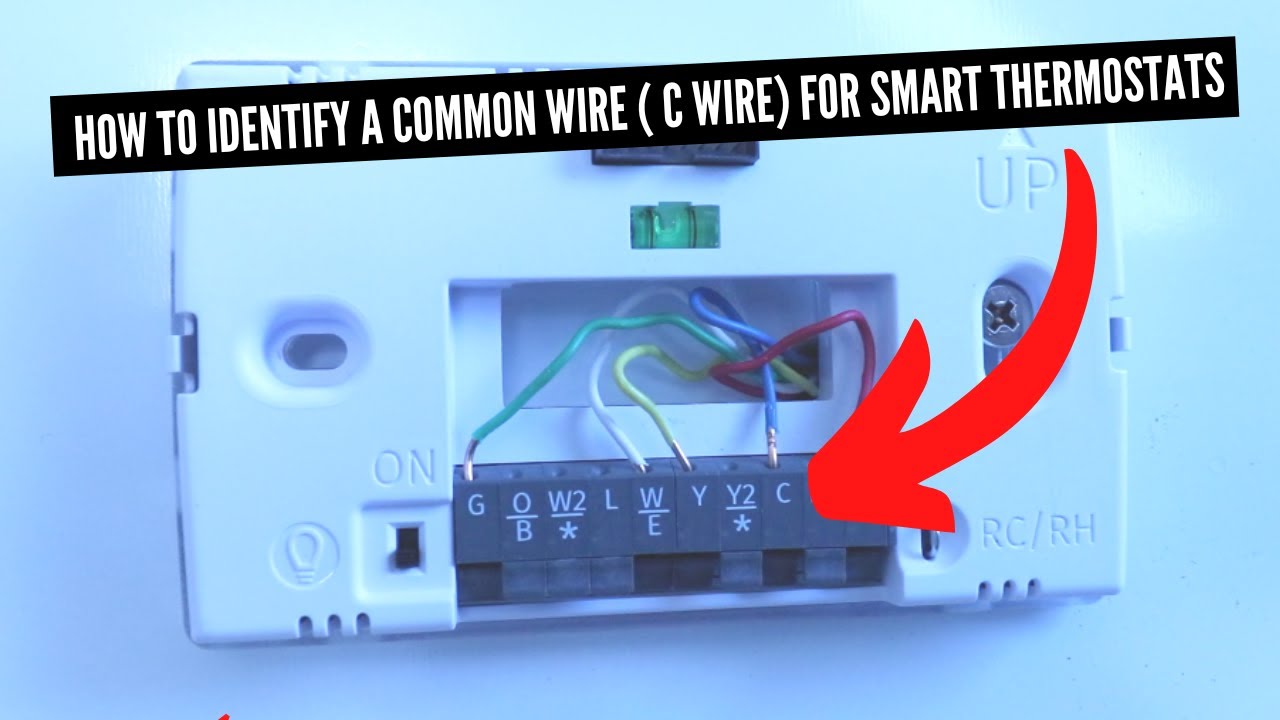
If you’ve ever asked, what is c wire, you’re in the right place. Smart thermostats make life easier, but the wiring behind them can feel like a puzzle. You see terms like R, W, Y, G, and C. You read about 24-volt power, transformers, and control boards. It can be a lot. Take a breath. We’ll walk through it in plain English, with real steps and clear choices you can use today.

The short answer: the C wire is the “common” side of 24V power
The C wire is the return path for your HVAC’s 24-volt power. It completes the circuit that keeps many smart thermostats powered up all the time. Most people ask what is c wire when they buy a smart thermostat and find an extra terminal they’ve never used before. Your system already has a transformer that provides 24VAC. The C wire connects one side of that power to your thermostat, while R (or Rc/Rh) carries the other side.

Think of it like a loop. R sends power out. C brings power back. That loop lets a thermostat run its screen, Wi‑Fi, sensors, and relays without relying on batteries. Classic, simple thermostats could run on batteries or “steal” a tiny sip of power from control lines. Today’s smart models draw more consistent power. That’s why the C wire matters now.
Common names you’ll hear:
- C wire
- Common wire
- 24V common
- C terminal
You don’t “control” anything with C. It is not heat, cool, or fan. It is the common side of low-voltage power. But without it, many modern thermostats act up, reboot, or drain batteries fast.
Why smart thermostats need a C wire
Smart thermostats have bright screens and always-on radios. They talk to your phone. They watch for motion. Some stream power to accessories. That load needs steady power. The C wire provides it.

You will see two design choices in the wild:
- Thermostats that require C and won’t work without it.
- Thermostats that can “work” without C, but prefer C for best stability.
The second type uses tricks to pull small bursts of power through other control wires. It can work, but it can also cause “ghost” fan runs, short cycling, or system noise. Some brands include a Power Extender Kit (PEK) to add a C wire function when your wall cable is short on conductors. We’ll cover those options below.
Constant power vs. batteries
Many older thermostats ran on batteries. They woke up to make a call for heat or cool. They slept the rest of the time. That model is simple but limited. A smart thermostat needs power non-stop. Batteries alone can’t keep up for long. A battery-powered smart stat is like a tablet that never sleeps. The battery will drain fast.

With a C wire, the thermostat has a stable power source. Batteries become backup, not the main fuel. Your screen stays bright. Your Wi‑Fi stays linked. Your schedule stays safe.
“Power stealing” and why it can cause problems
Some thermostats sip power from the control circuits. They draw tiny current through the heat or cool wire when the system is idle. That can keep the thermostat alive, but it can confuse your equipment. You might hear a relay click. Your fan might twitch. Your furnace board might throw a code.

On heat pumps, this can get worse. Power stealing can nudge contactors or reversing valves. It can also blow a low-voltage fuse if a wire shorts during an install. A proper C wire removes that risk. The stat gets real power. Your system sees clean signals.
How to tell if you have a C wire
You can check in a few minutes. Grab your phone for photos. Turn off power to your furnace or air handler at the switch or breaker before you pull the thermostat off the wall. Before you can answer what is c wire for your home, you need to know what wires are actually present. Gently remove the thermostat face and look at the letters on the wall plate.

You’re hunting for a wire going to the C terminal. It might be blue. It might be brown. It might be any color. Color is a hint, not a rule. If you see a wire on the C terminal, you likely have C. If you see an unused extra wire tucked in the wall, you may be able to repurpose it as C.
Check the thermostat wall plate
Look for terminals labeled R, Rc, Rh, C, W, W2, Y, Y2, G, O/B, Aux, or similar. Take a photo before you touch anything. If a wire connects to the C terminal, you’re set. If not, scan for any spare wires wrapped around the bundle or pushed back into the wall. One of those can often be used as C if it also connects to C at the furnace board.

If you see only two wires (often R and W), that’s a heat-only setup, common with boilers or older furnaces. Four wires (R, W, Y, G) is common in simpler heat/cool systems without C. Five or more usually means a C wire is present or at least available.
Check the furnace or air handler control board
Remove the service panel of your furnace or air handler. Turn off power first. Find the low-voltage control board. It will have small screw terminals with labels like C, R, W, Y, G. Look for your thermostat cable. It is the thin, multi-conductor bundle. See which color goes to C.

If a wire is landed on C at the board and the same color is unused at the thermostat, you can make that your C wire. If no spare wire exists, you can add a new cable, a PEK, or an add-a-wire kit. Keep notes of which color goes where. Label the wires with small tags or tape.
Heat pump and outdoor unit notes
Heat pumps add O/B (reversing valve) and often Aux/E (backup heat). The C terminal on the furnace or air handler usually connects to the outdoor unit too. That means the same C wire feeds both thermostat and outdoor equipment. Be careful not to short C to R when you work. That can pop the 3A or 5A fuse on the control board.
In some cases, the C wire to the thermostat is borrowed for an outdoor sensor or a humidifier. If so, you may need an add-a-wire or a new cable to give both devices the connections they need.
Understanding terminals and color codes
Thermostat terminals sound cryptic, but they map to clear functions. R is 24V power from the transformer. C is common. W is heat. Y is cool. G is fan. Heat pumps add O/B, Aux, and sometimes L or S. Dual-stage systems add W2 and Y2.
Colors in the cable are guesses, not rules. Blue often ends up on C, but not always. A past installer may have used different colors. Always match letters, not colors. Your control board is the truth source.
The usual terminal letters (and what they do)
- R (or Rc/Rh): 24V power from the transformer. Rc is cooling transformer power. Rh is heating transformer power. Many homes use a jumper between Rc and Rh.
- C: Common side of 24V power. The return path.
- W/W1: First stage heat call.
- W2/Aux: Second stage or auxiliary heat.
- Y/Y1: First stage cooling call; also runs the compressor on many systems.
- Y2: Second stage cooling.
- G: Indoor fan call.
- O/B: Reversing valve for heat pumps. O = cool-energized. B = heat-energized.
- E: Emergency heat on some heat pump systems.
- L: System monitor or alert on some equipment.
- S1/S2: Outdoor temperature sensor on some brands.
Your system may not use all of these. Simple systems use a few. Complex ones with zoning or dual fuel use more.
Wire colors: helpful, but not a promise
Installers often follow this loose guide:
- Red → R
- White → W
- Yellow → Y
- Green → G
- Blue or Brown → C
- Orange → O/B (heat pump)
- Black → Common or extra conductor
But any color can go anywhere. Never rely only on color. Confirm at the control board. A previous DIY fix may have swapped colors to whatever was free. Match the letters and take photos before changes.
Wiring diagrams in plain English
There’s a reason diagrams feel confusing. You see symbols and lines, not a real furnace. Let’s translate the common setups into clear words and simple layouts.
The big idea never changes:
- The transformer in your furnace or air handler makes 24VAC.
- One side of that power goes to R. The other side goes to C.
- The thermostat uses R and C to power itself, then “bridges” R to W, Y, or G to call for heat, cool, or fan.
2-wire heat-only (common in boilers or old furnaces)
You have R and W at the thermostat. When the thermostat calls for heat, it connects R to W. No dedicated C wire is present. Old mercury thermostats or simple digitals can work fine here. Smart thermostats will often need a new C connection or a power kit.
If you have a modern boiler control (like a Taco, Honeywell, or tekmar panel), check the manual. Many have C available at the control for modern thermostats. If not, you may need an external 24V adapter or a relay interface.
4-wire conventional heat/cool (R, W, Y, G)
This is a classic setup. The thermostat has power from R, calls for heat via W, cool via Y, and fan via G. No C wire is present. Many “no C” thermostats can run here using power stealing or a PEK. But stability improves a lot if you add C.
If your cable has a spare wire (often blue), you can land that on C at both ends and solve it cleanly.
5-wire with C (R, C, W, Y, G)
This is the modern standard for single-stage systems. The thermostat has a dedicated C wire, so power is stable. When the thermostat calls for heat, it connects R to W. For cool, it bridges R to Y. For fan-only, it bridges R to G.
This setup plays well with any major smart thermostat. It also supports accessories like humidifiers more easily.
Heat pump with O/B and Aux
Heat pumps add a reversing valve. The O/B wire tells the outdoor unit which direction to run. Some brands energize the valve in cool (O). Some energize in heat (B). Aux or W2 can control backup heat strips. C is vital for smart thermostats here. Power stealing on heat pumps can lead to contactor chatter.
When in doubt, check the air handler control board and the heat pump manual. Match the thermostat settings to your system: O or B, number of stages, and whether you have auxiliary heat.
Options if you don’t have a C wire
Not having a C wire is common. You have many valid paths forward. Your choice depends on cost, time, skill, and long-term stability. If “what is c wire” led you here because your wall has only two or three wires, don’t worry. The fix is within reach.
Here are your best options, in order from “easiest, low parts” to “best, long term.”
Use a spare wire in the existing cable
Pull the thermostat off. Look for unused conductors. Often a blue or brown wire sits unused. If you find one, connect it to C at the furnace control board and C at the thermostat plate. Label it. Done. This is the cleanest fix and costs nothing but time.
At the board, the C terminal may have several wires already. That is normal. Multiple devices share C. Make sure the screw is tight.
Run a new cable (18/5 or 18/8)
If you lack a spare wire, the best long-term fix is a new cable. Choose 18/5 at minimum. If you have a heat pump or plan for accessories, run 18/7 or 18/8. This gives you room for O/B, Aux, and sensors later.
Fishing a new cable can be easy or hard. If your thermostat sits over an unfinished basement or under an attic, it can be simple. If the wall is full of cross-bracing, it can be tough. If the run is hard, consider a pro. While they’re there, ask them to label and test each conductor.
Use a Power Extender Kit (PEK)
Some thermostat brands include a PEK. It is a small module that sits at your furnace control board. It re-maps your existing wires so your thermostat gains a C connection without running a new cable. Ecobee and some others offer PEKs that work well.
Pros:
- No wall fishing.
- Works on many systems.
Cons:
- Adds a module to the control board.
- Needs careful wiring and space in the cabinet.
Add-a-Wire or “common maker” modules
Products like Venstar Add‑A‑Wire split one wire into two signals. You mount a small device in the furnace and use a “sender” at the thermostat. This gives you an extra virtual wire. It is a great mid‑path when you can’t run new cable.
Pros:
- Inexpensive.
- Reliable when installed right.
Cons:
- Install adds complexity.
- Some combinations (with certain zoning boards) need extra care.
External 24V adapter (plug-in transformer)
You can power your thermostat with a separate 24VAC plug-in transformer. You bring two small leads from the adapter to Rc/R and C. This isolates the thermostat power from the furnace wiring. It can work for heat-only systems or old boilers.
Pros:
- No changes in the furnace.
- Fast fix for heat-only.
Cons:
- You need a nearby outlet.
- Cable management can look messy.
- Some thermostats still need proper calls to W/Y/G for full function.
Use the G wire as C (the old “fan wire swap”)
You can move the G wire to C and set the thermostat to use fan via a special mode or jumper. Some thermostats can run the fan call over Y in cool mode (fan comes on with cooling). You lose manual fan control. It’s a band-aid, not a long-term fix.
Pros:
- Free if your thermostat supports it.
- Works in a pinch.
Cons:
- You lose independent fan mode control.
- Heat pump or multi-stage systems may behave poorly.
Step-by-step: add a C wire the right way
Let’s walk the best-case fix: turn a spare wire into your new C wire. This is simple and safe if you go slow. Take photos. Label as you go. Don’t rush.
We’ll assume you have a typical gas furnace or air handler with an accessible control board.
Tools and prep
- Small screwdriver
- Needle-nose pliers
- Wire labels or tape
- Flashlight or headlamp
- Your phone for photos
- Multimeter (optional but helpful)
Turn off furnace power at the switch or breaker. Confirm the blower is off. Remove the front panel. Find the low-voltage terminal strip on the control board.
At the thermostat
- Pop off the thermostat face.
- Take a clear photo of the existing wiring.
- Note which wires go to R, W, Y, G, and any others.
- Pull any spare wire from the wall gently. Blue or brown is common.
Loosen the C terminal on the wall plate. Insert the spare wire. Tighten firmly. Tug gently to confirm it is secure. Label it C.
At the furnace control board
- Locate the thin thermostat cable from the wall.
- Find the spare wire you used at the thermostat.
- Loosen the C terminal on the control board.
- Insert the spare wire and tighten.
If the C terminal is full, use a short pigtail and a small wire nut to combine them. One end goes to the C terminal. The other ends tie the existing C wires and your new C together.
Test with a multimeter
Turn power back on. Set your multimeter to AC volts. Check between R and C at the thermostat. You should see around 24 volts AC (often 24–28VAC). If the reading is right, snap the thermostat back on. Follow the on-screen setup.
Run a quick test:
- Set heat a few degrees above room temp. Furnace should start.
- Set cool a few degrees below room temp (if you have AC). Compressor and fan should run.
- Turn on fan-only mode. Fan should run without heat or cool.
If it all works, you are done. Enjoy stable power and a stress-free smart home.
Safety, warranties, and code
You’re dealing with low voltage. It is safer than line power, but not risk-free. A short can blow a board fuse. A big mistake can damage a transformer. Be careful and plan ahead.
Read the equipment manual. Check local codes if you run new wire. Many HVAC makers state that improper thermostat wiring can void parts of a warranty. If you get stuck, call a licensed pro. Sometimes a quick house call costs less than replacing a control board.
Low-voltage is not no-risk
Even at 24VAC, a short between R and C can arc and blow the low-voltage fuse. That fuse protects the transformer and board. Keep wires neat. Do not strip more copper than you need. Turn off power during changes.
Use the right cable. Thermostat wire is 18 AWG, solid or stranded, rated for low voltage. Avoid bell wire or random speaker wire. Keep runs away from sharp metal edges.
Protect the transformer and board
If your furnace keeps blowing the low-voltage fuse, something is shorting. Common causes:
- Copper whiskers touching between terminals.
- A staple through the cable.
- A pinched wire behind the thermostat.
- A wrong add-a-wire hookup.
Replace a blown fuse with the same rating (often 3A or 5A, blade type). Do not bypass the fuse. If fuses keep popping, stop and call a pro.
Special cases many guides skip
Most web guides focus on simple systems. Real homes are not always simple. You might have zoning. You might have two transformers. You might have a millivolt boiler. One reason “what is c wire” can get messy is that homes vary more than you think. Let’s cover the oddballs so you are not stuck mid-install.
These are the cases where a PEK or add-a-wire might not be the right fit. Or where special settings matter more than wires.
Zoned systems with a zone panel
If you have multiple thermostats controlling one system, you likely have a zone panel (Honeywell, EWC, Aprilaire, etc.). Thermostats land on the panel, not the furnace board. Each zone has R, W, Y, G, and C terminals. Pull C from the panel, not the furnace.
Do not bypass the zone panel. It protects the equipment and controls dampers. If you lack conductors to each thermostat, run new cable or use brand-specific add-a-wire solutions that are zone-panel friendly. Some zone boards have dedicated C terminals for each zone. Use those.
Dual-transformer setups (separate heating and cooling power)
A few systems have separate transformers for heating and cooling, with Rh and Rc truly separate. Many smart thermostats can handle this. Some need a setup screen where you remove the jumper between Rc and Rh in software. Others want the jumper removed physically.
If you add C, make sure the C you use matches the transformer that powers your thermostat R terminal. Mixing commons between two transformers without a proper tie can cause damage. This is a case for a pro if you are unsure.
Boiler controls and millivolt systems
Some older boilers use millivolt thermostats. These do not use 24VAC at all. They use a thermopile to generate around 750mV. A smart thermostat will not work here without an isolation relay kit or a conversion control.
Modern boiler controls usually provide 24VAC and a C terminal. Check the controller model. Taco SR, Honeywell AQ or L series, tekmar: most have 24V terminals. Use those. If yours doesn’t, add a plug-in 24VAC transformer and a relay to interface the boiler’s call-for-heat loop safely.
Line-voltage thermostats (120/240V baseboards)
If your home uses electric baseboard heat with line-voltage thermostats, stop. That is a different world. You cannot connect a 24V smart thermostat directly. You need line-voltage smart controls or a relay panel that converts between the two.
Look for smart line-voltage thermostats designed for baseboard or radiant electric heat. They do not use a C wire in the HVAC sense.
Smart radiator valves and hydronic zones
In apartments with radiators, people often use smart TRVs on each radiator. Those do not need a C wire. They run on batteries and talk to a hub. If you do have a single thermostat that controls a boiler, most often you will add a 24V adapter and a relay to interface.
A pro can add a universal relay kit to keep the boiler controls safe. Then you can use a common modern thermostat, powered by C from the adapter.
Long wire runs, voltage drop, and Wi‑Fi reboots
In very large homes, the thermostat might sit far from the furnace. Long 18 AWG runs can have small voltage drop. Add power-hungry features, and you might see random reboots. If your thermostat reboots when the screen brightens, check voltage at R and C under load.
Fixes can include:
- Using a thicker cable if replacing (16 AWG).
- Moving the thermostat closer to the air handler.
- Using a plug-in 24V adapter at the thermostat for supplemental power.
Troubleshooting: quick guide you can trust
You wired everything, but something feels off. Here is a quick, no-fluff checklist for the most common problems. It can save you an hour on hold with support.
Start with basics: power off, inspect, power on, test with a meter. Keep the thermostat off while you verify voltages.
Thermostat shows no power or keeps rebooting
- Check R to C at the thermostat: do you see 24–28VAC?
- If not, check at the furnace board. If R to C is 24VAC there, the cable may be damaged.
- Replace the low-voltage fuse if it’s blown.
- Try a different spare wire for C to rule out a break.
If power is good but the stat still reboots, disable bright screensavers or motion wake. If that helps, you may have slight voltage drop on a long run. Consider a power extender or a new cable.
Fan runs nonstop or compressor chatters
- This often means a wire is touching where it shouldn’t. Look for copper strands bridging terminals.
- Make sure G is only in the G terminal.
- Make sure Y is not touching C.
- If you used an add-a-wire, recheck the module hookups.
On heat pumps, chattering can be contactor noise. Power stealing can cause it. A true C wire almost always fixes this.
Furnace works, AC does not (or vice versa)
- Check Y at the thermostat and the control board.
- Confirm the outdoor unit’s control wires (usually from the air handler to the outside condenser) are secure on Y and C.
- Some outdoor units have a float switch or safety that cuts the Y signal. Check the condensate pan.
If heating works and cooling doesn’t, you may have miswired Rc/Rh. Remove or add the jumper as your thermostat’s manual states. Many smart thermostats handle the jumper in software.
Low-voltage fuse keeps blowing
- You likely have a short to ground. Look at where the thermostat cable passes through metal. Use a rubber grommet or tape to protect it.
- Inspect the back of the thermostat plate. Screws can poke into wires.
- Disconnect the thermostat and test at the board. If the fuse holds with the thermostat removed, the problem is on the thermostat side.
Don’t upsize the fuse. Find the short and fix it.
Heat pump not heating or cooling right after install
- Check the O/B setting in the thermostat menu. Some brands energize in cool (O), some in heat (B).
- Verify Aux heat wiring on W2/Aux.
- Make sure the thermostat knows it is a heat pump, not a conventional system.
If the reversing valve is backward, the system will cool when you ask for heat. That setting flips it.
Buying advice: choose a thermostat that respects your wiring
Not all smart thermostats work the same way. Your wiring should guide your pick. Your answer to “what is c wire” ties directly to the model you choose. Look for a unit that fits your system and your wiring, not the other way around.
Ask yourself: How many stages? Heat pump or not? Do you want manual fan control? Do you have C now or can you add it later?
Thermostats that require a true C wire
Some models insist on a C wire for stability. They run bright screens and robust radios. If you can add C, this path gives you fewer headaches. Examples include many premium models from major brands. They draw enough current that power stealing is not an option.
Pros:
- Rock-solid power.
- Full feature set without gimmicks.
Cons:
- You must run a new wire or use a PEK if you lack C.
Models that can run without C (but prefer it)
A few top smart thermostats can run on two or four wires thanks to power stealing or a PEK. These are great for rentals or older homes. Even so, adding C later often makes them more reliable.
Look for:
- Included Power Extender Kit.
- Clear “no C” support in the manual.
- Support for heat pump settings if you have one.
Features that increase power needs
- Always-on voice assistants
- Large, bright displays
- Proximity sensors
- High-frequency Wi‑Fi polling
- Accessory control (humidifier, dehumidifier)
These load the thermostat harder. A C wire eliminates the “on the edge” feel you get with power stealing. If you want all the bells and whistles, plan for a real C wire.
Where most articles fall short (and how to avoid missteps)
We read a lot of guides before writing this. Many stop at “use the blue wire for C” and call it a day. Real homes are messier. Here are the gaps we see over and over—and how to plug them.
- They skip zone boards. Fix: Identify your zone panel. Pull C from the correct zone terminals.
- They ignore dual transformers. Fix: Keep commons matched. If in doubt, get a pro.
- They downplay heat pumps. Fix: Verify O/B logic and Aux settings.
- They push the G-to-C swap as a cure-all. Fix: It’s a last resort. You lose fan control.
- They avoid multimeters. Fix: A simple 24VAC check saves hours of guesswork.
- They gloss over wiring damage. Fix: Check for pinches and metal edges. Use grommets.
- They forget about long runs. Fix: If the stat reboots on screen wake, check voltage drop.
Real-world lessons from field installs
- Label every wire before you pull anything off. A minute now saves a day later.
- Take a photo at the thermostat and at the control board. Phones are free insurance.
- Keep spares. If you’re running a new cable, run more conductors than you need. You will thank yourself later.
- Keep a couple of 3A and 5A automotive fuses on hand. Many furnaces use them.
And yes, if you’re unsure, call a pro. One hour of labor can protect a $400 control board and your weekend.
Apartment and landlord tips
- If you rent, get written OK before you touch wiring.
- Use a thermostat model that includes a PEK or runs without C. Keep the old thermostat and faceplate to put back later.
- Avoid running new cable in walls you don’t own. Use an external 24V adapter and clean cable clips for a tidy look.
Landlords love reversible installs. Keep your work neat and well documented.
Glossary: HVAC wiring in simple words
Jargon can make this feel harder than it is. Here is a quick glossary you can scan before you dive in.
- 24VAC: The low-voltage power used by most HVAC controls. Supplied by a transformer.
- Transformer: The part that turns 120/240V into 24VAC.
- Control board: The brain inside your furnace or air handler. It has the low-voltage terminals.
- Common (C): The return side of 24VAC. Powers thermostats and accessories.
- R/Rc/Rh: The hot side of 24VAC. Rc for cooling, Rh for heating on dual-transformer systems.
- Heat pump: A system that can heat or cool by reversing the refrigeration cycle.
- O/B: Signal for the heat pump’s reversing valve.
- Aux/EM heat: Backup electric or gas heat for a heat pump.
- PEK: Power Extender Kit. A module that simulates a C wire using your existing wires.
- Add‑a‑Wire: A device that creates one extra virtual wire using a small module.
- Millivolt: Very low-voltage systems using a thermopile, common on some old boilers or wall heaters.
- Zoning: Using multiple thermostats and dampers to control different areas of a home.
FAQs
What does the C stand for in C wire?
- C stands for “common.” It is the common side of the 24V transformer. It completes the power loop to your thermostat.
Do all smart thermostats need a C wire?
- Many do. Some work without C using power stealing or a PEK. They usually work better with a real C wire.
Can I use the G wire as C?
- You can in a pinch. You lose manual fan control in most cases. It’s a temporary fix, not a best practice.
What if I only have two wires, R and W?
- That is a heat-only system. You can run a new cable, use a plug-in 24V adapter with a relay, or choose a thermostat made for two-wire setups.
Is the C wire dangerous to touch?
- It is low voltage, but you should still turn off power before you work. You can blow a fuse with a short. Be careful.
What color is the C wire?
- Blue is common, but not a rule. Match letters, not colors. Always check the control board.
Can I add a C wire myself?
- Yes, if you are comfortable. Turn off power, take photos, and go slow. If you feel unsure, hire a pro.
What if my fuse keeps blowing?
- You have a short. Inspect for copper strands touching, crushed cables, or screws through wires. Replace the fuse with the same rating and try again.
Why does my stat reboot when the AC starts?
- Voltage drop or power stealing issues are likely. Add a true C wire, shorten the run if possible, or use a PEK.
Do heat pumps need special settings for O/B?
- Yes. Some brands energize the reversing valve in cool (O), others in heat (B). Pick the right one in the thermostat setup.
Can I power my thermostat with a plug-in adapter?
- Yes. Many people do this in heat-only homes. Make sure your thermostat still connects to the system’s W (or Y, G) for control.
Will adding C void my warranty?
- It shouldn’t if you wire it correctly. But improper wiring can cause damage. If you are unsure, call a licensed technician.
How do I know if my system uses a zone panel?
- If you have more than one thermostat for the same system, look for a zone control board near the furnace. Thermostat wires land there, not directly on the furnace control board.
What size wire should I run for a new thermostat cable?
- 18 AWG is standard. Use 18/5 at minimum. For heat pumps or future add-ons, consider 18/7 or 18/8.
Conclusion
You now have a clear picture of the C wire and why it matters. By now, “what is c wire” should be easy to answer in your own words. It is the common side of 24V power. It keeps your smart thermostat steady and happy. It solves random reboots, ghost fans, and short-cycling headaches.
If you have a spare conductor, use it as C. If not, pick the fix that suits your home: run a new cable, use a PEK, try an add‑a‑wire, or add a clean 24V adapter. Don’t fear the control board. Take photos. Label wires. Use a meter if you can. When things feel complex—zoning, dual transformers, millivolt—pause and call a pro.
A solid C wire turns a fussy upgrade into a one-time win. Your thermostat stays online. Your system runs as it should. And you can get back to the part that matters: a home that feels just right, day and night.
