
If you have ever tapped the thermostat and wondered why the heat kicks on a minute later or why the AC cycles at odd times, you are not alone. Many of us use this small wall gadget every day, yet few of us know what happens behind the scenes. Here’s the simple truth: a thermostat is a sensor, a tiny switchboard, and a brain, all in one. It reads the room, decides what to do, and tells your HVAC to act. Once you see that flow, the rest makes sense.
This guide breaks the topic into plain steps you can follow. We will unpack sensors, wiring, power, and control logic. We will show how mechanical and smart units differ. We will solve common issues like short cycling and power problems. We will also call out what most guides skip, like heat pump balance points, real-world wiring quirks, and privacy tips. By the end, you will know how a thermostat thinks and how to make it work for your home.
We will keep the language simple and the steps clear. We will also share hands-on tips from long testing of popular smart models. You will learn how to place, set, and troubleshoot your device. You will also see what features save energy and what is just hype. If you came here to learn how home thermostat works, you are in the right spot.
The quick version: what a thermostat really does
Think of your thermostat as a relay operator. It measures room temperature. It compares that reading to your setpoint. If the room is too cold or too hot, it closes a low-voltage circuit to command heat or cooling. When the room hits the target, it opens the circuit and your system stops. That is the loop, over and over.

Here is that loop in plain steps:
- Sense: Read the current temperature (and often humidity).
- Decide: Compare the reading to your setpoint and your chosen mode.
- Act: Switch one or more 24V control lines to start heat, cool, or fan.
- Check: Keep sampling as the room changes.
- Stop: Open the control line once the setpoint is reached.
With a modern smart thermostat, the loop can be smarter. It can watch how fast your home warms up. It can start early so you wake up to the right temp. It can learn your schedule or use your phone’s location. But the core loop never changes.
The basic physics: how thermostats sense temperature
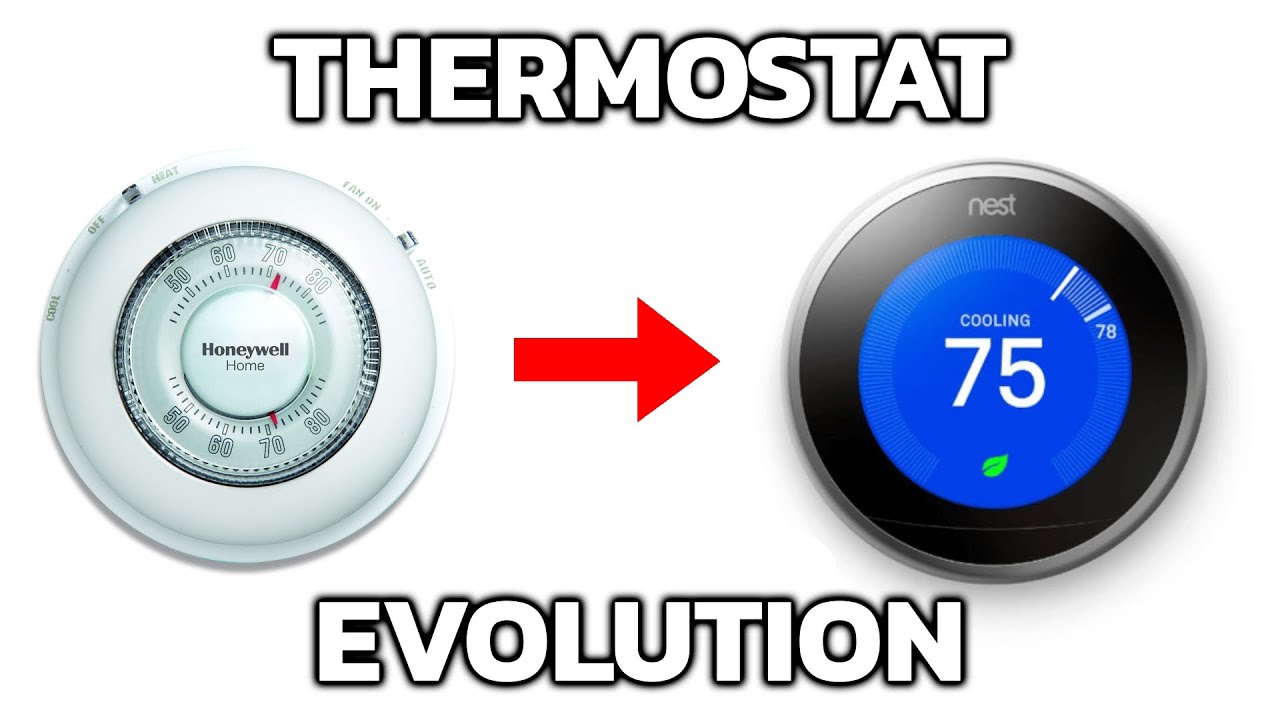
The heart of any thermostat is the sensor. Old models used bending metals to move a switch. New ones use tiny electronic parts that change resistance with heat. Both methods turn a temperature change into an electrical change. That change triggers the HVAC control.
There are two main sensor types you will see today:
- Mechanical: A bimetal strip or coil with a simple switch.
- Digital: A thermistor or other solid-state sensor and a microcontroller.
Mechanical thermostats: simple and sturdy
A classic mercury or bimetal unit relied on physics you could see. A bimetal strip is two metals bonded together. Each metal expands at a different rate as it warms. The strip bends as the room changes temperature. That bend flips a switch to turn heat or AC on or off. Old units used a glass bulb with a drop of mercury as the switch. Newer mechanical ones use a simple snap switch instead.
Pros:
- Very reliable. Few parts to fail.
- No Wi‑Fi or power needed.
- Simple to wire and cheap to replace.
Cons:
- Coarse control. Wider temperature swings (called hysteresis).
- No scheduling or remote control.
- Poor at handling multi-stage or heat pump systems.
You can still find these in older homes or cabins. They work fine with basic furnaces. But they are not great for tight comfort control.
Digital thermostats: sensors, chips, and smarter control
Digital units replaced bends and bulbs with thermistors. A thermistor is a tiny part whose resistance changes with temperature. The thermostat reads that resistance and converts it to a temperature reading. A microcontroller runs logic on that reading. It then triggers small relays or solid-state switches to control the HVAC.
This opens the door to features:
- Tight temperature control with a defined deadband.
- Custom schedules and vacation modes.
- Multi-stage heating and cooling support.
- Heat pump logic with auxiliary heat.
- Extras like humidity control, air quality data, and filter reminders.
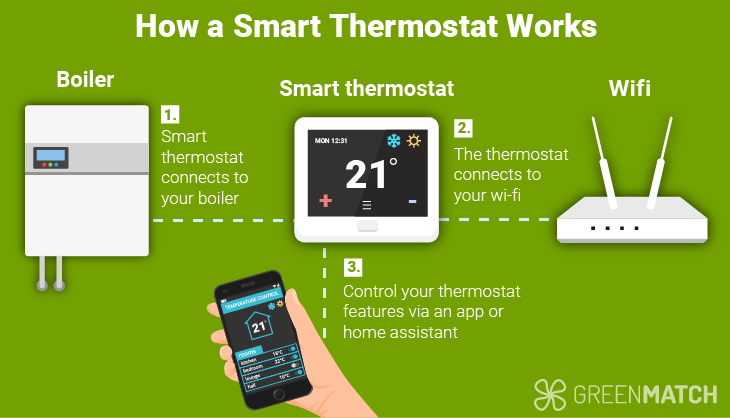
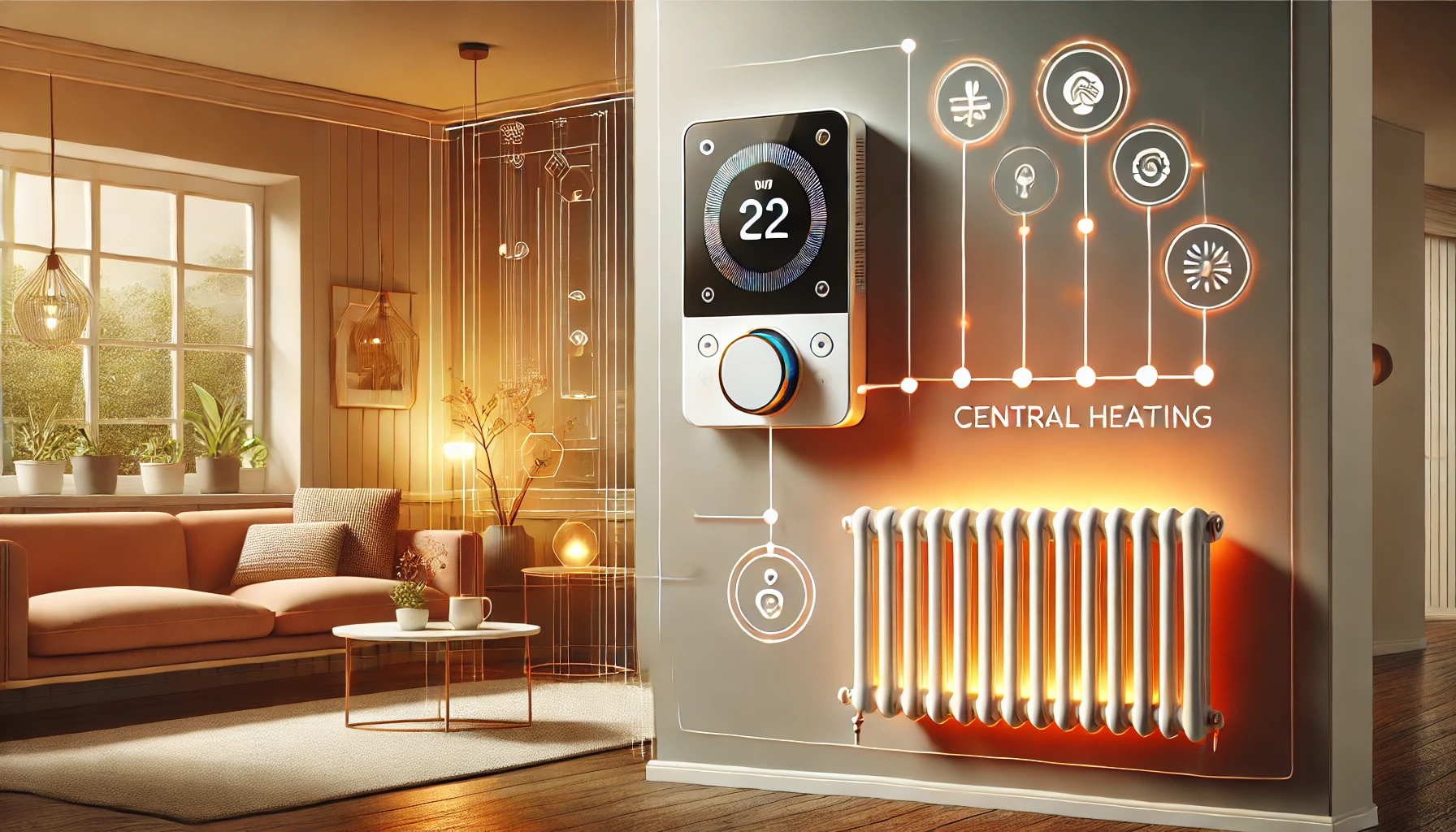
Smart thermostats add Wi‑Fi, learning, and app control. Many support geofencing, voice assistants, and home automation. Some connect to matter or thread networks. The sensor still does the same job. The brain just gets more inputs and options.
Low-voltage vs line-voltage thermostats: a key difference
Most US systems use low-voltage 24V AC control. Furnaces, air handlers, and heat pumps expect simple on/off commands at that voltage. Baseboard heaters and some radiant systems are different. They use line-voltage thermostats that switch 120V or 240V power directly. You cannot mix these without the right parts.

Here is what to know:
- Low-voltage (24V): Common in forced air and heat pump systems. Uses R, C, W, Y, G, O/B, and other terminals. Very common for smart thermostats.
- Line-voltage (120/240V): Used with electric baseboard or some radiant heaters. These thermostats switch full house voltage. They are not compatible with most smart units without a relay or a special model made for high voltage.
If your thermostat wires are thick and tied to 120/240V, stop and check. You may need a line-voltage smart thermostat or a contactor/relay interface. Many guides skip this, and it is a costly mistake.
The control signals: R, C, W, Y, G, O/B, and friends
A low-voltage thermostat sits between you and the HVAC’s control board. It does not power the furnace itself. It only opens and closes small control circuits. These are the wires you will see when you pop the cover.
Common terminals:
- R or Rc/Rh: 24V hot. Rc for cooling power, Rh for heating power. Often jumpered.
- C: The common side of 24V. Provides a return path and power for smart units.
- W/W1/W2: Heat call. W2 is second stage heat.
- Y/Y1/Y2: Cooling or compressor call. Y2 is second stage cooling.
- G: Indoor fan.
- O/B: Reversing valve for heat pumps (energized in cool for O systems or heat for B systems).
- Aux/E: Auxiliary or emergency heat for heat pumps.
- L, S1/S2, or proprietary: Diagnostic lights, outdoor sensors, or brand-specific features.
Color codes vary. White is often heat, yellow is cool, green is fan, orange is O, and blue or black is C. But do not trust color alone. Always label before removing. Many homes have surprise wiring choices from past repairs.
Heat pumps: reversing valves, auxiliary heat, and balance points
A heat pump is an AC that can run in reverse. The compressor moves heat either out of the house (cooling) or into it (heating). The reversing valve flips that flow. Some brands energize O in cooling. Others energize B in heating. Get this wrong and your system will heat when it should cool.
Key tips:
- O/B setting: Your thermostat must match the system. Check the air handler board or manual.
- Auxiliary heat: Heat pumps often have electric strips or a gas furnace backup. The thermostat calls Aux when the pump cannot keep up or when defrost runs.
- Balance point: This is the outdoor temperature where the heat pump loses efficiency. Dual fuel setups can switch to gas heat below that point. Good thermostats let you set or learn this.
- Compressor lockout: Protects the compressor in very cold weather. The thermostat or the board may enforce it.
If your heat feels weak, check Aux behavior. If your bill spikes in winter, Aux may run too often. Smart thermostats can optimize this with outdoor data and adaptive logic.
Two-stage and variable-speed systems
Many modern systems run at more than one level. Two-stage furnaces have W1 and W2. Two-stage compressors have Y1 and Y2. Variable-speed systems ramp fan and compressor smoothly. The goal is even comfort, better humidity control, and lower noise.

Thermostat control options:
- On/Off staging: The thermostat decides when to go to stage 2 based on time or temperature gap.
- Demand staging: The HVAC board makes staging calls based on sensors and load.
- Communicating systems: Some brands use a digital bus and a matched thermostat. These may not work with third-party smart models unless you add a module.
If you upgrade your thermostat, match it to your staging. Set delays and thresholds so you do not overuse stage 2. That saves energy and reduces wear.
Zoned HVAC: dampers, panels, and room control
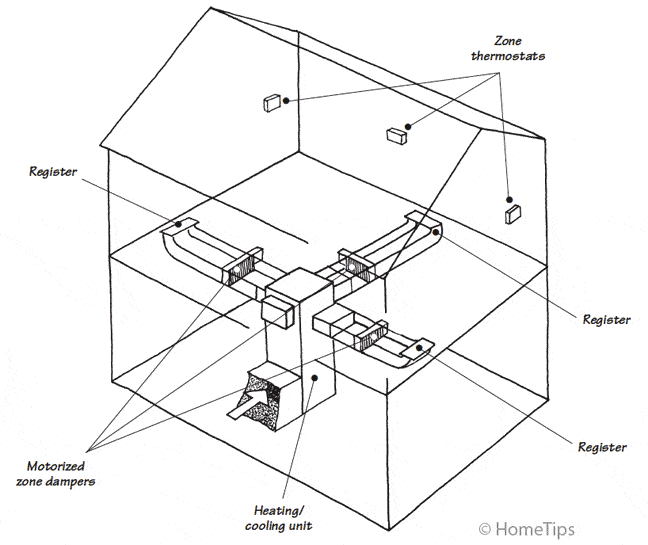
A zoned system splits ducts into zones with motorized dampers. A zone control board manages calls from several thermostats or room sensors. The idea is simple: heat or cool where you need it, not everywhere.
What matters:
- Bypass and airflow: With fewer vents open, static pressure rises. Your system must handle it.
- Zone priority: The panel decides which zone to serve first. It also limits how many zones can call at once.
- Smart room sensors: Some thermostats use remote sensors to balance rooms without dampers. They act like “soft zones.”
Zoning can be great, but it needs careful setup. Wrong damper timing can cause short cycling or coil freeze. Check the panel manual and match the thermostat mode for zone calls.
Inside a smart thermostat: parts and features that matter
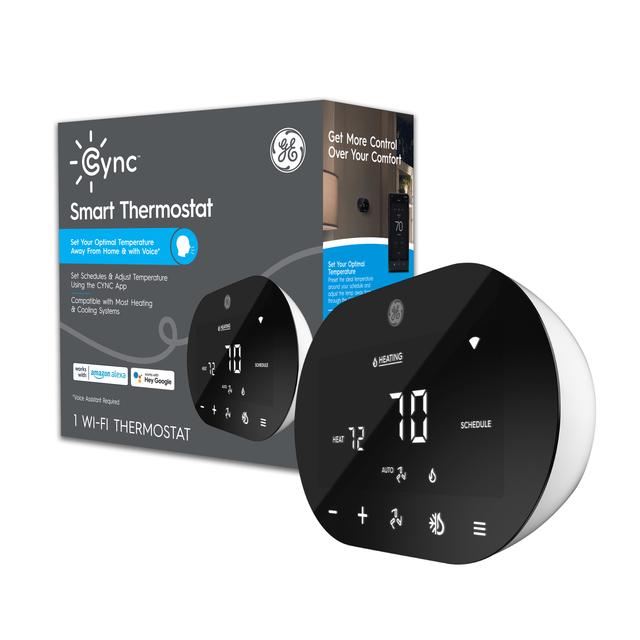
A smart thermostat is a small computer on your wall. Inside, you will find a sensor, a power supply, a microcontroller, relays or triacs, a Wi‑Fi or Thread/802.15.4 radio, and often BLE. The firmware ties it together. The app gives you control. A cloud service may help with learning or voice commands.
Key features to look for:
- Clear screen with at-a-glance info.
- Solid sensor accuracy and steady sampling.
- Easy-to-use schedules and quick overrides.
- Good handling of heat pumps and multi-stage systems.
- Reliable Wi‑Fi and backups when offline.
- Local control if the cloud goes down.
In testing, small interface details matter. Speed to wake, swipe targets, and screen brightness can shape daily use. Backup batteries, wiring adapters, and a strong wall plate also help.
Power and the C-wire: how smart thermostats stay alive
Old thermostats could run without power because they were mechanical. Smart models are different. They need power for the screen, radios, and logic. That power comes from the HVAC via the R and C terminals. Without C, the thermostat may “power steal,” but that can be flaky.
Ways to power your thermostat:
- C-wire: Best option. Stable and simple.
- Add-a-wire adapters: Convert unused wires or split signals to create a C. Many brands ship one in the box.
- External 24V transformer: Plug-in power supply connected to R and C. Use only if your HVAC board cannot provide C.
- Power stealing: Not recommended. It can cause chattering relays or fan ghost starts.
If your screen reboots or Wi‑Fi drops, power is the first thing to check. Look for 24V between R and C with a meter. If you see less or the reading bounces under load, fix the wiring.
Sensors and room awareness: beyond temperature
The main sensor reads temperature. Many smart models add more data. A humidity sensor helps with comfort control. Motion sensors detect presence for set-back logic. Remote room sensors can average temps across rooms or pick a “follow me” room.
Use cases that help:
- Even out hot/cold rooms by averaging remote sensors.
- Use occupancy to set eco mode when you leave.
- Control dehumidify features when humidity spikes.
- Drive a smart ceiling fan or shade with home automation.
Sensor placement matters. Do not aim a motion sensor at a hallway that gets traffic but not time spent. Put a remote sensor in the room you care about most at that hour.
Control logic: hysteresis, deadbands, and adaptive recovery
A thermostat does not flip the system on and off at the exact setpoint. It uses a small buffer called a deadband or hysteresis. This avoids rapid cycling. Smart models go further. They learn how fast your home heats and cools. They adjust start times and run times for comfort and efficiency.
Terms you may see:
- Hysteresis: The wiggle room around the setpoint, often ±0.5°F to ±1°F.
- Deadband: A gap between heating and cooling. Prevents both at once. Often 2–3°F.
- Adaptive recovery (or smart recovery): Starts early so the room hits the setpoint at the time you set. Not after.
- Cycle rate: Max starts per hour. Lower rates for radiators, higher for forced air.
- PID-like control: Some systems use math to reduce overshoot. They adjust run time to your home’s thermal profile.
Tweak these settings, if your model allows, to match your system. Radiant floors need gentle, longer cycles. Heat pumps need careful deadbands to avoid Aux heat.
Connectivity and privacy: Wi‑Fi, Matter, and your data
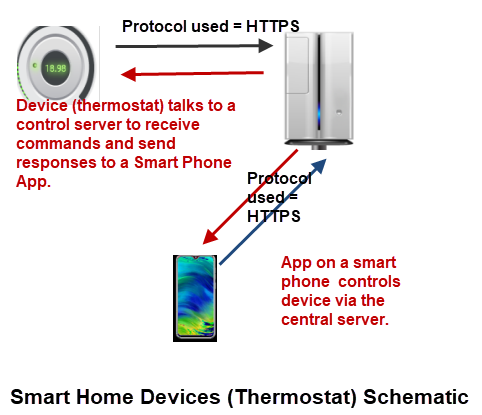
Smart thermostats connect to Wi‑Fi for apps and voice. Some add Thread or Matter for local control. Voice platforms include Alexa, Google Assistant, and HomeKit. That is great for scenes like “Goodnight” that set back temps and lock doors. But you should also think about privacy and uptime.
Best practices:
- Prefer models with local control when the internet is down.
- Check what data goes to the cloud and how long it is kept.
- Use two-factor authentication for the account.
- Update firmware. Auto-updates are best.
- If you join a utility demand-response program, learn how load-shed events affect comfort.
Many competitor guides skip these points. A thermostat holds occupancy data and schedules. Treat it like a smart door lock in terms of security care.
Step by step: how your thermostat actually controls the system
Let’s walk through a typical cycle on a winter morning. You set heat to 70°F for 6 a.m. The thermostat starts sampling the room. It knows your home warms at about 2°F per 10 minutes when the furnace runs. It also knows the duct still has warm air for a minute after the burner stops. It starts heat at 5:40 a.m. and runs the fan a bit longer after the burner shuts down. That is adaptive recovery in action. And that is one way to grasp how home thermostat works in practice.
A simple cycle:
- Decision: Room is 68°F, setpoint is 70°F. The thermostat calls for heat.
- Action: It connects R to W1. The furnace control board starts ignition. The indoor fan starts after a short delay.
- Monitor: The thermostat keeps reading the temp. At 69.5°F, it keeps running to avoid falling short. It knows the system coasts up to 70°F after stop.
- Stop: It opens W1 at 69.8°F. The residual heat carries the room to 70°F.
- Idle: It watches for drift. If the room falls to 69°F, it cycles again.
Cooling is similar, but the coil needs time to cool down and avoid short cycling. Good thermostats add minimum on/off times to protect the compressor.
Heat pumps add a twist:
- Defrost mode can blow cool air for a moment. Some thermostats run the indoor fan slower or use Aux to mask it.
- In deep cold, the thermostat may lock out the compressor and call Aux heat only.
These steps are simple to say but nuanced in practice. The best thermostats know your system’s pace. They trim the timing to avoid overshoot and to save power.
Placement and calibration: small choices, big payoff
Mounting a thermostat is not hard, but placement matters more than you think. Bad placement can cause constant cycling, uneven rooms, or false readings. Calibration is also key. A few degrees off can cost real money over a year. If you care about how home thermostat works day to day, start here.
Placement tips:
- Height: About 5 feet from the floor.
- Avoid: Sunlight, exterior walls, drafty halls, kitchens, and near supply vents.
- Airflow: Space the wall plate from the wall cavity or use a foam gasket to block drafts.
- Rooms: Pick a central room you spend time in. Use remote sensors for hot/cold spots.
Calibration steps:
- Check with a trusted digital thermometer at the same height. Let both sit for 15 minutes.
- If off by more than 1°F, use the thermostat’s calibration offset if available.
- For big swings, check for wall drafts. Seal the wire hole with putty or foam.
- Confirm humidity readings too. Humidity can skew comfort and control.
A little setup pays off. Many “bad thermostat” posts are really “bad placement” problems.
Avoid placement traps: sunlight, drafts, and dead zones
Direct sun can fool a sensor by 5°F or more. A draft from a stairwell can do the same. Dead zones are corners where air does not mix well. All of these will confuse control.
Common traps:
- Above a return grille. The suction pulls cool air up past the sensor.
- On an exterior wall. The wall may be colder in winter.
- In a hallway you never sit in. The hall may be cooler than the living room.
- Behind a TV or near appliances. Heat from electronics spoils readings.
Fixes:
- Move the thermostat or use a remote sensor as the control temperature.
- Add a small diffuser to a vent that blows on the thermostat.
- Seal wall gaps and use the wall plate to block air leaks.
Calibrate and test like a pro
Treat this like setting a scale before you weigh luggage. A five-minute test prevents weeks of poor comfort.
Quick test:
- Place a known-good thermometer beside the thermostat.
- Wait. Do not touch for 15 minutes.
- Compare readings. Adjust calibration in the app if needed.
- Trigger heat or cool and watch the cycle. Note how far it overshoots or undershoots.
- Tweak cycle rate or deadband if your model allows it.
Do this at installation and once a year. Dust, aging sensors, and wall changes can nudge readings.
Energy-saving features that actually save money
Good thermostats save energy without making you cold or hot. Some features move the needle. Others sound cool but add little. Here is what our long-term testing says.
Worth it:
- Schedules with set-backs: A simple weekday/weekend plan can save 10% or more.
- Adaptive recovery: Hits your target at wake time without long, wasteful runs.
- Geofencing and occupancy: Cuts waste when you leave. Great if your schedule varies.
- Humidity control: Dry air feels cooler. Lower humidity in summer with a short overcool can improve comfort.
- Circulate fan mode: Mixes air to even out rooms. Use sparingly to avoid extra power draw.
- Learning algorithms: Helpful, but only if they align with your life. If not, lock in a manual schedule.
Nice to have:
- Energy reports: Helpful for spotting habits.
- Voice control: Handy, but not essential for savings.
- Weather overlays: Useful for heat pump staging and lockouts.
Skip or limit:
- Aggressive comfort hold all day. It defeats your set-backs.
- Frequent fan-only runs. They can reheat or recool the house via ducts in hot attics or cold basements.
Schedules vs learning, and where geofencing fits
There is no one right answer. If your life is regular, a schedule wins. If it is chaotic, geofencing can shine. Learning sits in the middle. It guesses your pattern from your changes.
Simple plan:
- Start with a schedule. Morning warm-up, daytime eco, evening comfort, sleep set-back.
- Add geofencing as a layer. Let it switch to eco when all phones leave.
- Keep learning on only if you are okay with changes the thermostat makes. Some people love it. Some find it messy.
Pair with scenes:
- “Leaving” scene lowers temp, turns off lights, and locks doors.
- “Goodnight” scene sets sleep temp, arms security, and dims screens.
Comfort extras: dehumidify, fan circulate, and smart recovery
Humidity is half of comfort. At the same temperature, humid air feels warmer in summer and cooler in winter. Thermostats that read humidity can do more to keep you happy.
Tips that work:
- Dehumidify with overcool: Let AC drop temp 1–2°F to pull extra moisture. Great in muggy areas.
- Reheat/dehumidification: If you have a system with reheat coils, use it for precise humidity control.
- Fan circulate: Run the fan 10–20 minutes per hour to mix air. This can fix hot/cold rooms without changing the setpoint.
- Smart recovery: Use it to wake up to the right temp at the right time.
Use these with care. Overcool too much and you waste energy or feel cold. Circulate too much and you add fan energy use and duct losses.
What most guides miss: pro tips and real-world gaps
A lot of thermostat guides skim the hard parts. They skip power issues, heat pump edge cases, privacy, or wiring traps. That leaves you stuck when the basics do not fix the problem. This section fills those gaps so you can avoid costly callbacks and long weekends without heat. It also helps clarify how home thermostat works when your setup is complex.
Key gaps we cover here:
- Low-voltage vs line-voltage mistakes: Many guides never warn you about 120/240V baseboard systems. Wrong pairing can fry gear.
- Power stealing pitfalls: A smart thermostat that steals power can chatter relays or ghost the fan. Use a C-wire or adapter.
- O/B confusion: Mixing O and B leads to heat when you want cool. Always confirm the reversing valve logic in the air handler.
- Outdoor temperature lockouts: Helpful for heat pumps and dual fuel. Many guides never mention balance points.
- Two-stage timing: Default staging can waste energy. Tune stage 2 delay and thresholds for your home’s thermal mass.
- Humidity-led comfort: Dehumidify overcool and reheat are big comfort wins. Many guides skip them.
- Privacy and security: Your schedule is sensitive data. Use local control and MFA if possible.
- Open protocols: OpenTherm (common in boilers) can modulate heat, not just on/off. US guides often miss this.
- Radiant and boiler nuance: Radiant floors have long lag. Radiator or boiler systems need lower cycle rates and early starts.
- Wiring colors are not standard: Label before you remove. Pictures save hours. Some guides pretend colors are fixed.
Use these tips as a checklist when you design or upgrade your setup. They prevent most “my thermostat is broken” issues.
Troubleshooting: quick fixes for common thermostat problems
When comfort slips, start simple. Check power. Check modes. Check the filter. Then work through the control logic. Most issues have a short list of root causes. This section helps you map symptoms to fixes fast and shows, in plain terms, how home thermostat works when things go wrong.
Quick pre-checks:
- Is the thermostat in the right mode? Heat, cool, or auto?
- Is the setpoint higher/lower than the room by at least 2°F?
- Is the air filter clean?
- Are breakers on? Is the furnace door switch pressed in?
- Does the outdoor unit run when cooling is called?
Short cycling and overshoot
Short cycling is when the system turns on and off too often. It wastes energy and wears parts. Overshoot is when the room goes past the target. Both tie back to settings, placement, or system sizing.
Fixes:
- Increase deadband slightly to reduce short cycling.
- Adjust cycle rate for your system type: lower for radiant, moderate for furnace, higher for tight ducted systems.
- Check placement for drafts or sun. Seal wall gaps.
- For heat pumps, set minimum run times to protect the compressor.
- Clean or replace dirty filters that starve airflow.
- If the system is oversized, use staging or a fan circulate mode to smooth swings.
Heat pump blowing cool air or Aux running all the time
A heat pump can feel cool at the vent because supply air is just warm, not hot. But if it never warms, something is off. Constant Aux heat can cause shocking power bills.
Fixes:
- Verify O/B setting matches your system. Flip it if heat comes on during cool or vice versa.
- Set a reasonable Aux lockout. Prevent Aux from running until it is truly needed.
- Check defrost mode behavior. Brief cool flow is normal. Long cool flow is not.
- Clean outdoor coils and ensure the fan runs.
- In dual fuel systems, check gas heat staging and lockouts.
No C-wire, random reboots, or screen going dark
Smart thermostats need stable power. No C-wire is the most common source of weird behavior.
Fixes:
- Add a C-wire using a spare conductor if one exists.
- Use the brand’s add-a-wire kit.
- Install a plug-in 24V transformer if the HVAC board cannot provide C.
- Turn off power stealing in settings if possible.
- Check for a blown low-voltage fuse on the furnace control board (often 3A or 5A).
Wiring colors do not match the labels
Colors help, but they are not rules. A “green” wire may not be G. Someone may have reused colors during a past repair.
Fixes:
- Take a photo of the old thermostat wiring before you remove it.
- Open the air handler or furnace panel and note the connections at the control board.
- Label each wire with the terminal it was on, not the color.
- Use a multimeter only if you know how. 24V AC between R and C is normal.
If in doubt, stop and call a pro. A quick service call is cheaper than replacing a fried board.
Safety and compliance: small steps, big peace of mind
Working around HVAC controls is safer than working at full line voltage, but it still deserves care. A little prep keeps you and your system safe. It also helps you keep warranties intact.
Safety checklist:
- Kill power at the breaker before wiring. Some systems have two breakers.
- Confirm with a non-contact tester and the unit’s power light.
- Use the right tools. Small screwdrivers, needle-nose pliers, and a headlamp help.
- Do not over-tighten terminal screws. Stripped lugs cause bad connections.
- Replace the furnace door before power-up. The safety switch must be pressed.
Compliance and warranty:
- Keep your thermostat manual and the HVAC manual together.
- Record your wiring, settings, and any changes.
- If you join a utility program, read the fine print about temperature adjustments.
- If you rent, ask your landlord before changing the thermostat.
The future: smarter control, better comfort, and lower bills
Thermostats are moving past simple schedules. They are becoming part of a whole-home control loop. That loop includes sensors, insulation, windows, shades, and even EV chargers and water heaters. The thermostat will be the conductor, not just the metronome.
Trends to watch:
- Matter and local automation: Less cloud, faster control.
- Better heat pump support: Smarter balance points and Aux control.
- True modulation: Wider support for systems that vary output smoothly, like OpenTherm boilers and inverter compressors.
- Grid-aware homes: Voluntary demand response that is gentle on comfort.
- More sensors: CO2, VOCs, and room-level presence. Comfort is not just temperature.
We will also see better security models. Your home’s climate pattern is private data. Expect more on-device learning and encrypted local networks.
FAQ
Q: Do I need a C-wire for a smart thermostat?
A: It is strongly recommended. A C-wire provides stable power. Without it, some models “steal” power, which can cause glitches. If you do not have one, use an adapter or have a pro pull a new cable.
Q: What is the difference between Rc and Rh?
A: Rc feeds the cooling transformer. Rh feeds the heating transformer. Many systems tie them together at the furnace, so you see a jumper at the thermostat. If you have separate systems, do not jumper them.
Q: Why does my heat pump feel like it blows cool air?
A: Heat pumps deliver warm, not hot air, often around 90–100°F. That can feel cool against your skin. If rooms never reach setpoint or Aux runs all the time, check O/B settings and Aux lockouts.
Q: Are thermostat wire colors standardized?
A: No. White is often W, yellow is Y, green is G, orange is O, and blue/black is C, but do not trust colors alone. Label by terminal, not color. Take photos before you disconnect anything.
Q: What is hysteresis or deadband?
A: It is a small buffer around your setpoint. It prevents the system from turning on and off too often. A typical deadband is 1–2°F. It protects equipment and smooths comfort.
Q: Where should I mount my thermostat?
A: About 5 feet high, on an interior wall in a room you use often. Avoid sun, drafts, kitchens, and direct airflow from vents. Seal wall holes to prevent drafty readings.
Q: Can I use a smart thermostat with electric baseboard heat?
A: Not with a standard low-voltage model. Baseboard heat uses line voltage. You need a line-voltage smart thermostat or a relay interface designed for high voltage.
Q: What is adaptive or smart recovery?
A: It is a feature that starts heating or cooling early so the room reaches your setpoint at the time you set. It learns how fast your home changes and tunes start times.
Q: Is learning better than a fixed schedule?
A: It depends. If your days are regular, a schedule is simple and reliable. If your routine changes, geofencing and learning can help. You can also mix them.
Q: How often should I recalibrate my thermostat?
A: Check once a year or if comfort feels off. Compare with a known-good thermometer and adjust the offset if needed. Also check for drafts behind the wall plate.
Conclusion
A thermostat looks simple, yet it shapes your comfort and your bill more than any other smart device at home. It reads, decides, and switches. That loop has been the same for decades, from bimetal coils to AI-driven units. The changes are in the details: better sensors, better power, smarter logic, and stronger privacy. When you grasp how home thermostat works, you can set it up right, pick the features that matter, and fix small issues before they become big ones.
From heat pumps and auxiliary heat to staging and zoning, the thermostat sits at the center. Place it well. Power it well. Tune it to your system. Use schedules, geofencing, and adaptive recovery to match your life. And keep an eye on privacy and security, because your comfort data is personal. Do those things, and that little screen on your wall becomes a real comfort win, not just another smart gadget.
